A usable screen position
Compare the window, screen and shading at the times you work; a compass label alone cannot settle it.
Explore daylight positions
Desk and garden route
Sketch where you’ll sit, what reflects in the screen and how you’ll walk back to the house after dark. Give the installer those observations with your lighting brief.
At a glance
Compare the window, screen and shading at the times you work; a compass label alone cannot settle it.
Explore daylight positionsGive task, general and background lighting clear roles, then check the actual product and control combination.
Read the specificationsInclude the approach, entrance, return journey and neighbouring windows in the lighting brief.
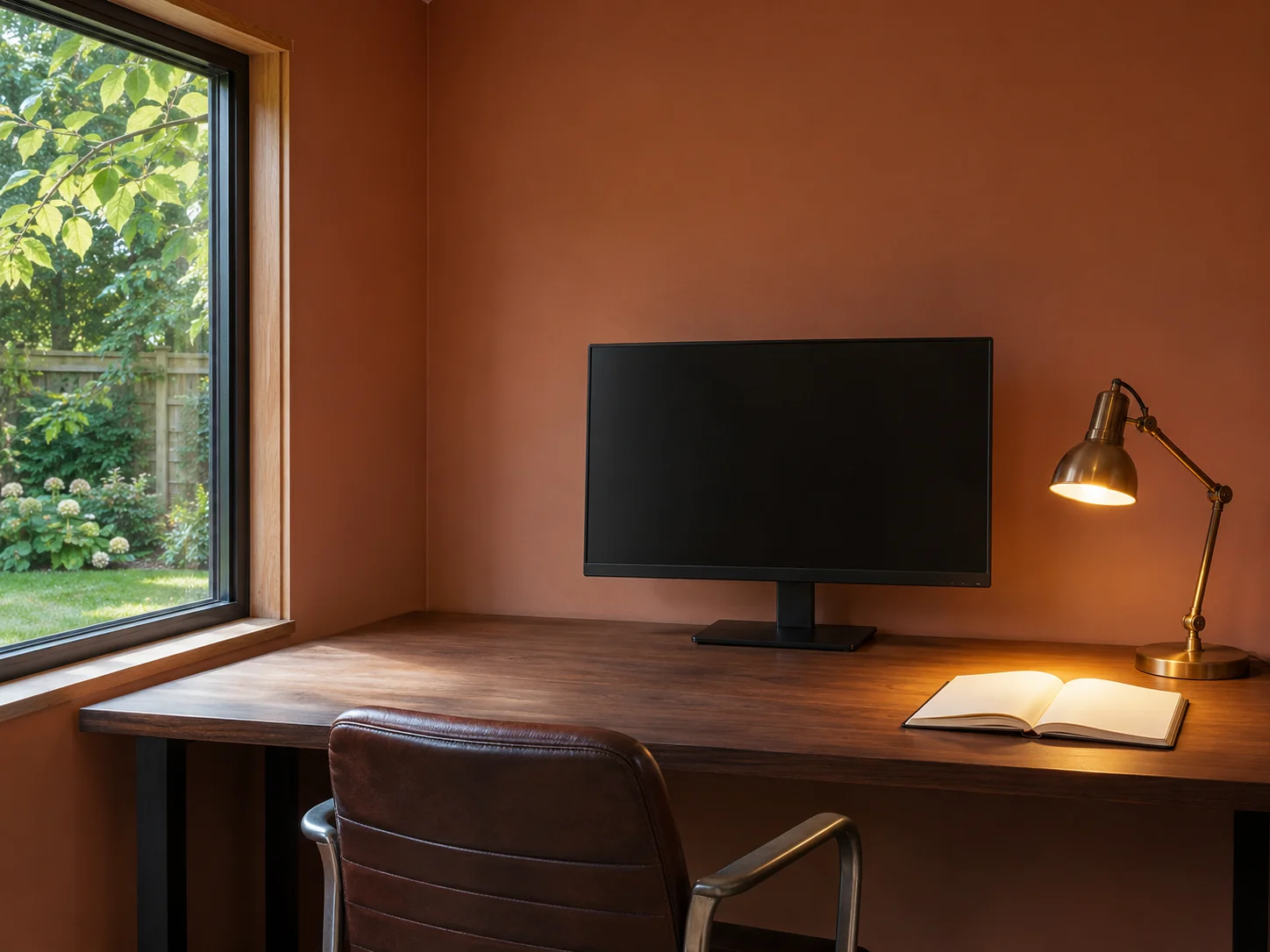
Plan the route outsideSit where you’ll work and look at your screen. Even with a clear view of the garden, a reflection can make text hard to read. Check the opening you can see ahead of you, the light behind you and anything reflected in the display.
The HSE workstation checklist asks about screen glare, reflections, working window coverings and suitable lighting. It also notes that some reflection and comfort checks must wait until the workstation is installed. Use the examples below to identify what to observe, then repeat those checks in your actual room.
Each diagram shows the same room, desk, screen and person. Only the window and shading position change. The arrow shows where the user looks; it is not a light ray. These diagrams have no measured room dimensions or compass bearing, and they do not predict the brightness or reflection of a particular installation.
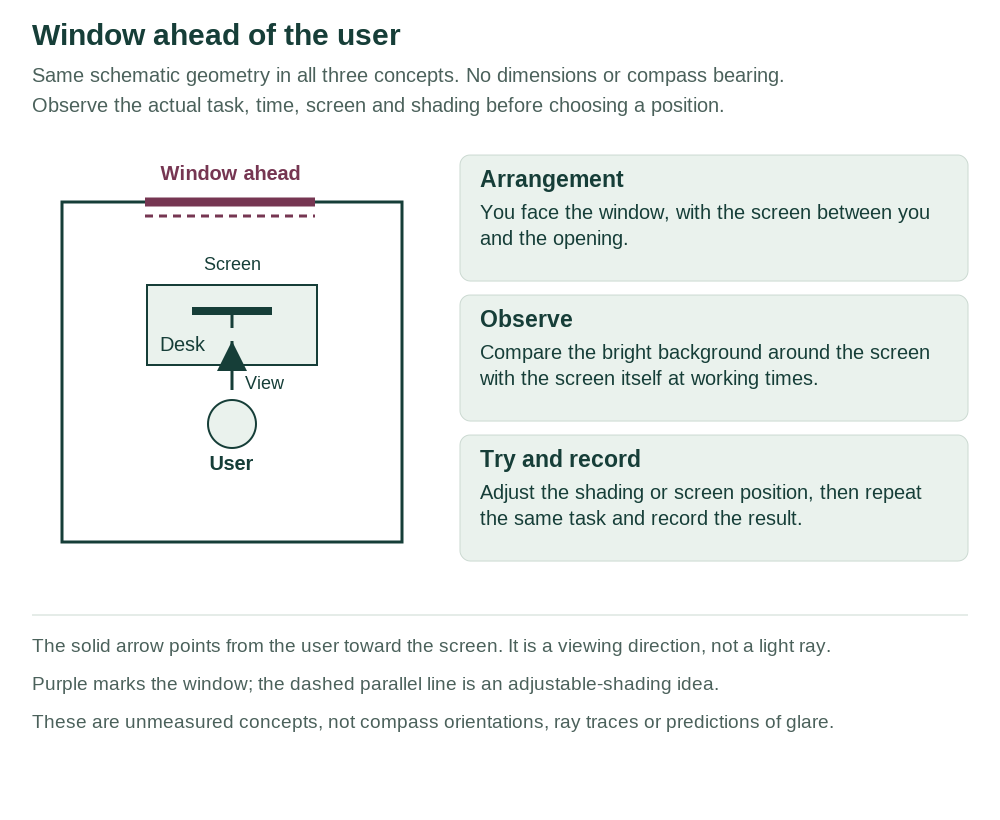
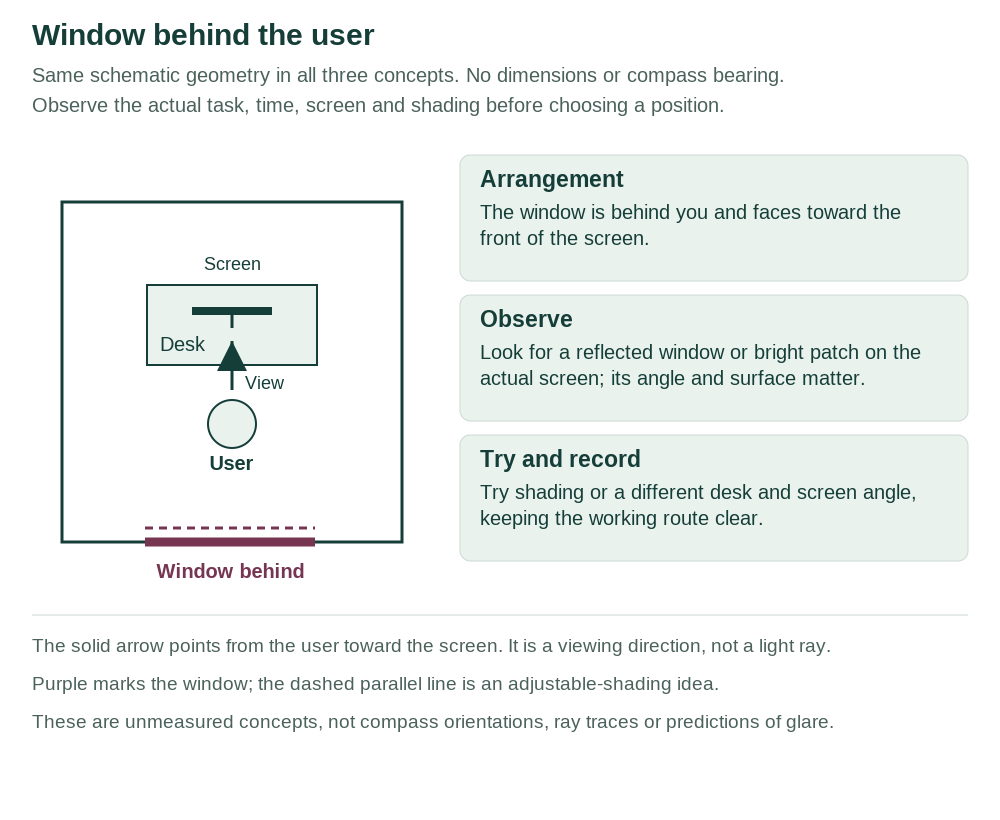
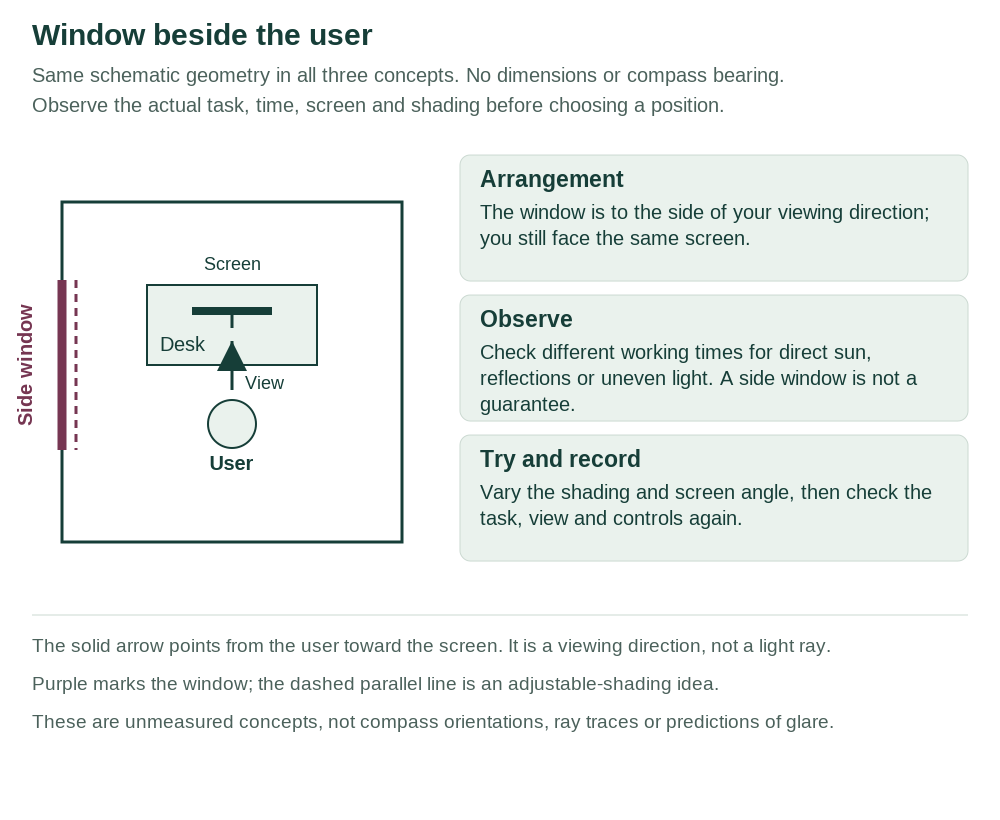
A compass label does not settle the desk position. Record the opening’s actual orientation, your working hours, obstructions and shading. Compare the conditions when you use the room; a single visit cannot establish what happens in another season. If you have not observed an important period, keep it as a follow-up question.
With south-facing glazing, include the times when direct sun can reach the proposed work area and how shading will be operated. Also keep heat and ventilation questions in the room specification. Changing a blind setting to improve screen visibility does not, by itself, prove that the room will stay comfortable.
A rooflight is another possible bright source above the workspace. Check it from the normal seated position, with the actual screen tilt, and during paper-based work. Ask about suitable shading and how it can be reached and maintained. A rooflight’s presence does not establish that the desk below will be glare-free.
If window positions are still being chosen, compare the proposed view, screen placement, storage, shading and opening access together. If the room already exists, try reversible changes to the screen, furniture and shading first. The interiors guide helps relate those choices to the rest of the room; the comfort guide keeps the separate thermal and ventilation questions visible.
Describe what each light needs to help you do before deciding on a fixture count. Computer work, reading papers, drawing and video calls can expose different shadows or bright surfaces. HSE’s lighting guidance treats the task, local control, reflection, contrast and equipment shadows as relevant design questions. Its industrial example levels are not a single target for every garden office.
A desk lamp or another local fitting serves the work surface. Try the actual paper, tools and input devices; check whether your hand or equipment blocks the light and whether the source reflects in the screen. Keep the control and plug accessible.
Ceiling lights or another general arrangement support movement and activities across the room. Compare surface, pendant, recessed or indirect options with the available ceiling and construction details. Their shape, position and distribution matter as well as how many fittings are included.
Light on a wall or another background can change the contrast around the task or the appearance of a video call. Test it from the working seat and through the camera you use. An attractive background is not evidence that the desk itself has suitable light.
Ask the installer to coordinate any fixed fitting with the ceiling, insulation, structure and maintenance access. For garden office ceiling lights, a tidy grid on a plan is only a layout proposal: it must be checked against the actual desks, furniture and selected products. No fixed spacing or number of downlights follows from the room’s floor area alone.
Lumens describe visible light output from a source. They do not tell you how much reaches a particular part of the desk after the fitting distributes the light.
Illuminance describes light arriving per unit area at a specified surface. The task plane, fitting positions, obstructions and conditions matter. Dividing advertised bulb lumens by room floor area is not a verified desk measurement.
Power consumption and a lamp’s maximum permitted bulb power are different fields. Keep the actual source specification separate from the limit on the fitting that holds it.
Colour temperature describes the warm-to-cool appearance of white light. It is not brightness or a promise of concentration. Compare the actual product setting with the task and the other lights in the room.
The output and illuminance distinction follows the glossary in HSE’s Lighting at work, second edition (1997). That older document is used here for terminology, not as a newly checked project standard or a source of universal domestic design values.
The pair already used in the interiors item example shows why the individual fields matter. These exact manufacturer specifications were checked on 21 November 2026; this is not a tested lighting arrangement or a new shopping recommendation.
| Exact product | Published data and what it means |
|---|---|
| SVALLET work lamp, article 703.584.92 | E14 globe opal-white bulb is separate. Maximum 8.6W; height 35cm; base diameter 16cm; cord 200cm. The maximum is a lamp limit, not the selected bulb’s consumption. |
| SOLHETTA bulb, article 805.915.03 | E14, 470lm, 4000K, 45mm diameter and not dimmable. Technical information lists rated power 3W; the measurements field lists power 2.9W. Keep those field labels rather than silently merging them. |
IKEA lists that SOLHETTA variant in the lamp’s “Complete with” section. Its 470lm output does not establish illuminance at your desk, and its 4000K colour temperature does not establish the right choice for every user. The non-dimmable specification also matters: this pair is not a dimming example.
If dimming is part of the brief, ask for a compatible fitting, light source and control combination. For smart controls, record what needs a network or hub and how someone will operate the lights without the app. Decide which lighting roles should be controlled separately, then check the actual operation after installation.
Plan exterior lighting around the whole arrival and departure sequence. A light beside the office door may leave the approach or return route unresolved. Walk the route in daylight first, identify what needs to be seen, then ask the installer to propose suitable positions and controls.
Discuss aiming, shielding, timers, sensors and manual operation as a combined proposal. A sensor should be checked against the intended approach and departure movements. A timer or app is not a substitute for understanding how the system behaves when conditions change.
DEFRA’s artificial-light nuisance guidance for England identifies domestic security and decorative lighting as possible sources of nuisance. It says assessment considers the effects and context, including timing, frequency and duration; there is no fixed light level that alone decides statutory nuisance. That is England-specific guidance, not a judgement on your proposal or the legal position elsewhere in the UK.
For an external fitting, give the installer its proposed location and exposure and request a suitable product and installation specification. There is no universal weather rating, cable route or mounting position established by this guide. Include lighting spill and controls in the after-dark review; a brighter fitting is not a guarantee of a better route or improved security.
Use the electricity and broadband guide to separate internal lighting, external work and the connection from the house. Get the exact scope in writing: a supplier’s included fitting count does not settle those responsibilities or prove the lighting works for your tasks.
Keep two linked records: what you observed, and what the designer or installer is being asked to provide. A photograph can help identify a position or reflection, but it is not a calibrated light measurement. If numerical verification is needed, ask the responsible lighting professional to specify the method, task plane, conditions and acceptance criteria.
Use the same seat, screen and task when comparing a change. Record what was actually checked, then repeat at another relevant time. Do not fill an unobserved period with an assumed result.
| Record field | Your observation or brief |
|---|---|
| Task and viewpoint | Actual task, user and seated or standing position; identify the screen or work surface. Record: ____ |
| Date, time and conditions | Date, working time, weather and season; say which other conditions remain unobserved. Record: ____ |
| Openings and shading | Window or rooflight location, actual orientation, nearby obstructions and shading setting. Record: ____ |
| Screen and furniture position | Screen angle and setting, desk position and any relevant reflective surface. Record: ____ |
| Artificial light state | Which lights are on, their positions, settings and controls in use. Record: ____ |
| What you observed | Reflection, bright background, shadow, hard-to-see detail or another specific issue; attach a note or photo. Record: ____ |
| Change and result | Change one controllable factor, repeat the task and record the difference; include any new problem. Record: ____ |
| Next check and owner | Unresolved question, who will assess it and when to revisit it, including another season if needed. Record: ____ |
Attach a room plan and the observation record. Identify the proposed work surfaces, fixture locations and control needs, then ask a qualified electrical installer and, where needed, a lighting designer to resolve the specification. This buyer brief does not supply a circuit design, certify an installation or replace the appropriate workplace assessment.
| Record field | Your observation or brief |
|---|---|
| Room and work surfaces | Measured room, ceiling and task-plane dimensions; drawing version and evidence status. Record: ____ |
| People, tasks and hours | Normal tasks, multiple users, special visual requirements and arrival and departure times. Record: ____ |
| Positions and daylight | Desk, screen, storage, windows, rooflights and shading; attach the observation log. Record: ____ |
| Lighting roles and products | Task, general, background and arrival needs; exact fittings, light sources and product data. Record: ____ |
| Controls and operation | Separate zones, switches, dimming compatibility, sensors, timers and manual operation. Record: ____ |
| Mounting and building fabric | Proposed locations, roof or ceiling constraints, access for maintenance and responsible designer. Record: ____ |
| Electrical and package boundary | Internal fittings, sockets, house connection, exterior work, data or smart-control dependencies and installer responsibilities. Record: ____ |
| Outside route and spill | Path, changes of level, door and lock, return journey, neighbouring windows and directions to keep dark. Record: ____ |
| Price and unresolved scope | Written inclusions, options, VAT, installation, making good, controls, commissioning and unpriced work. Record: ____ |
| Handover and follow-up | Operating instructions, inspection and test records, applicable compliance documents, occupied checks and named action owners. Record: ____ |
At handover, try the controls and the agreed tasks with the furniture and equipment in place. Revisit the entrance and return route after dark, including the intended sensor or timer operation. Record reflections, shadows, visibility or spill that still need attention, and agree who will change the arrangement and check it again.
Keep operating instructions, product information, inspection and test records and any applicable compliance documents with the project file. These are separate from your observation log. The log can describe a problem; it does not turn a consumer check into professional approval.
Use the quote comparison guide to compare the same lighting and connection scope, carry the complete allowance into the project budget, and retain the questions in the project brief. The office buying guide brings those decisions back to the building as a whole.
Primary lighting and product pages were checked on 21 November 2026. The diagrams show possible window and screen positions. They use no measured room or lamp data. No physical tests were made of light at the desk, glare, light spilling outdoors or changes with the seasons. The HSE May 2013 workstation checklist informs observation questions; its 1997 Lighting at work glossary is used only for terminology. Exact manufacturer data remains distinct from design advice. Project-specific qualified electrical and lighting input must be obtained through the brief and is not claimed here. Take the desk position, window direction and hours of use to your lighting designer or electrician when comparing fittings.